
RTOSVisor with Intel® Core™ Ultra Series 3 processors: EtherCAT, simulation, and Windows on one PC
acontis evaluates EtherCAT workload consolidation with Intel® Core™ Ultra Series 3 processors
Industrial systems often need to run real-time control, operator interfaces, and engineering workloads on the same computer. In this enablement effort, we evaluated our products RTOSVisor, EC-Master, EC-Simulator, and EC-Engineer on a reference system powered by an Intel® Core™ Ultra X7 358H processor (Panther Lake-H). Together, the Intel platform and our software give industrial developers a way to assess whether consolidating these workloads on one system can simplify integration while meeting their application's timing requirements.
RTOSVisor partitions system resources so real-time applications can run on assigned CPU cores, memory, and network interfaces while Windows runs in a separate virtual machine. The isolation and timing results described in this article reflect the specific hardware and software configuration we tested.
Peripherals such as drives, I/Os and sensors are connected via EtherCAT, the real-time Ethernet protocol widely used in machine building. Our EtherCAT MainDevice software EC-Master is designed for high performance: in the tests described here, it controls three physical drives and a simulated network of up to 100 drives at a cycle time of 1 ms, and still leaves plenty of computing time for the actual control application.
During development and testing, EC-Simulator can model an EtherCAT network when physical drives are not available or when the network is too large to assemble on a development bench. This can help teams start developing and testing a control application before commissioning.
This article walks through our setup using RTOSVisor, a Type 1 real-time hypervisor, on an Intel® Core™ Ultra X7 358H reference system. We assign CPU cores, memory, and Ethernet ports across three virtual machines, then run EC-Master with three Bosch Rexroth drives, replace the drives with EC-Simulator in software, scale the simulated network to 100 drives, and move the simulation to a separate VM for a Hardware-in-the-Loop setup.
A note on terminology: we use the current terminology of the EtherCAT Technology Group (ETG). The MainDevice is the controller that operates the EtherCAT network (formerly “master”). The SubDevices are the nodes in the network, in our case the drives (formerly “slaves”). Console output still uses the old terms in places.
1. Hardware
Intel provided a reference platform with the following hardware configuration. The measurements presented in this article were performed on this platform; results and available BIOS settings may differ on other systems.
| Component | Details |
|---|---|
| CPU | Intel® Core™ Ultra X7 358H processor (Panther Lake-H): 4 P-cores, 8 E-cores, 4 LP E-cores, 16 threads |
| Board | Intel PTL-UH DDR5 Embedded CRB (reference board) |
| Memory | 64 GB DDR5-5600 (2 × 32 GB) |
| Ethernet Port 1 | Intel I210 PCIe plug-in card (8086:1533, PCI 56:00.0), EtherCAT for VM1 |
| Ethernet Port 2 | Intel I210 PCIe plug-in card (8086:1533, PCI 01:00.0), EtherCAT for VM2 |
| Ethernet Port 3 | Intel I219-V onboard (8086:57b4, PCI 00:1f.6), TCP/IP for Windows |
| EtherCAT SubDevices | 3 × Bosch Rexroth drives ctrlX DRIVE XCS (CoE) |
2. Software installation and hardware assignment
In this chapter we set up the reference system as shown in the diagram: the RTOSVisor hypervisor splits the hardware across three virtual machines, and each virtual machine runs its own operating system with its application.
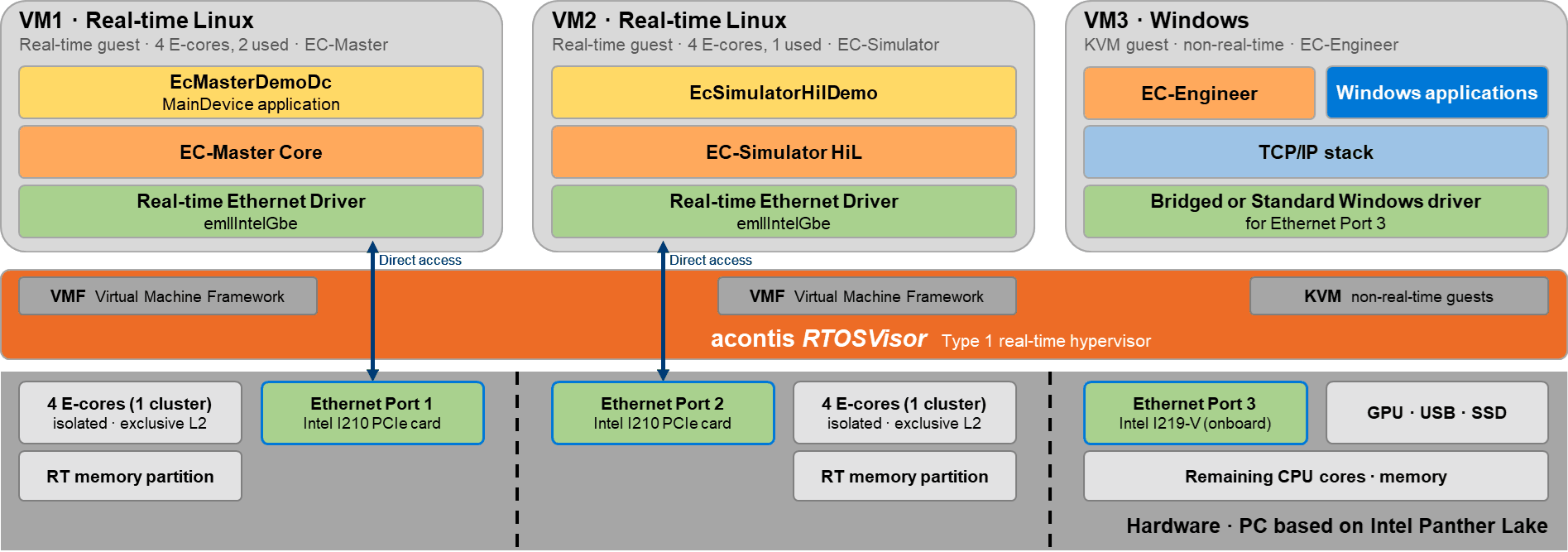
- VM1, real-time Linux: runs EC-Master with the EcMasterDemoDc application and EC-Simulator SiL. VM1 gets a complete E-core module with exclusive L2 cache, its own memory partition and Ethernet Port 1 (Intel I210). The acontis Real-time Ethernet Driver
emllIntelGbeaccesses the card directly. - VM2, real-time Linux: runs EC-Simulator HiL with EcSimulatorHilDemo. VM2 is set up just like VM1, with the second E-core module, its own memory partition and Ethernet Port 2 (second Intel I210).
- VM3, Windows: Windows runs as a KVM guest on the remaining cores and uses the GPU, USB and SSD. It also runs EC-Engineer, which we use to configure the EtherCAT networks. Ethernet Port 3 (onboard I219-V) is connected via a host bridge or with the standard Windows driver.
The real-time guests run under the acontis Virtual Machine Framework (VMF) and have direct access to their hardware. In the configuration tested, load in Windows had no noticeable effect on the timing of the real-time applications (see Test 1).
We install in this order:
- RTOSVisor on the PC (steps 1 to 3).
- Hardware partitioning, then create and start VM1 and VM3 (steps 4 and 5).
- EC-Master and EC-Simulator SiL in VM1 (steps 6 and 7).
- Second network card, VM2 and EC-Simulator HiL (steps 8 and 9).
The RTOSVisor host is a lean Debian Linux with our real-time kernel (PREEMPT_RT). It manages the guests and, at boot time, reserves contiguous memory for the real-time guests and for the shared memory through which the guests can exchange data. The following steps cover only what is specific to this setup. The general installation is described in the RTOSVisor documentation.
Step 1: BIOS settings
On the reference platform we check four settings. The option names and menu paths below apply to the BIOS of this platform and may differ on other systems. All paths start in the Intel Advanced Menu:
| Setting | Menu path | Value |
|---|---|---|
| Intel (VMX) Virtualization Technology | CPU Configuration | Enabled |
| VT-d | System Agent (SA) Configuration > VT-d setup menu | Enabled, required for PCI device assignment |
| Intel(R) TCC Mode | Intel(R) Time Coordinated Computing | Enabled |
| Secure Boot | Disabled |
Intel® Time Coordinated Computing (Intel® TCC) is a set of platform features designed to support real-time workloads. On this board, the Intel® Time Coordinated Computing Mode (Intel® TCC Mode) option enables a set of BIOS settings; the specific options depend on the board and BIOS version.
We leave Intel SpeedStep® technology and Turbo Mode enabled at their default settings. The RTOSVisor host kernel keeps the cores out of C-states anyway. With these settings, the E-cores of the real-time guests run at up to 3.2 GHz. In our measurements this gave lower latencies than a fixed base clock of 1.5 GHz. Our goal was good values for both latency and jitter: with idle=poll in the real-time guests (see step 4), enabling SpeedStep and Turbo did not increase the jitter, while the latency improved significantly.
On current Intel platforms, the frequency (P-state) of P-cores can be selected individually per core. E-cores, by contrast, are grouped into modules of four cores that share one P-state, so their frequency can only be set per module (Intel TCC User Guide, August 2026). This is another reason to assign each real-time guest a complete E-core module: no other workload can request a different P-state for its cores.
Step 2: Install RTOSVisor from a USB stick
Write RTOSVisor.iso to a USB stick with Rufus (ISO image mode) and boot the target PC from it. We use RTOSVisor V9.2.0.0.
- Select Install acontis RTOSVisor and let the installer erase existing operating systems.
- Create a user account with a password.
- After the reboot, keep the default boot entry Configure RTOSVisor.
Step 3: Connect the System Manager
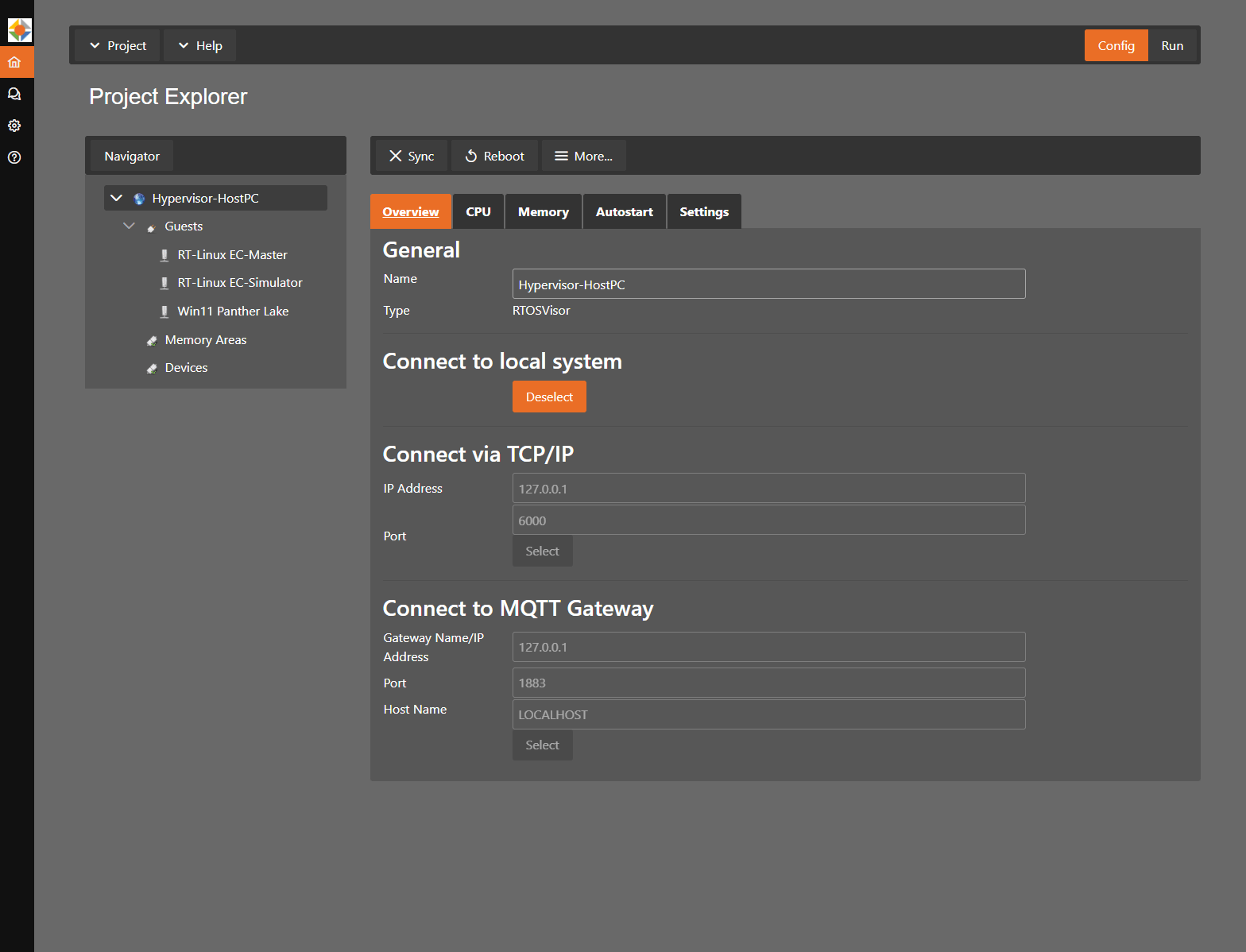
The System Manager is a web-based configuration tool that runs on the host. Open a browser on the host and go to http://127.0.0.1:5000. Select Local Connection. The System Manager then runs the initial Sync automatically.
Step 4: Partition the hardware
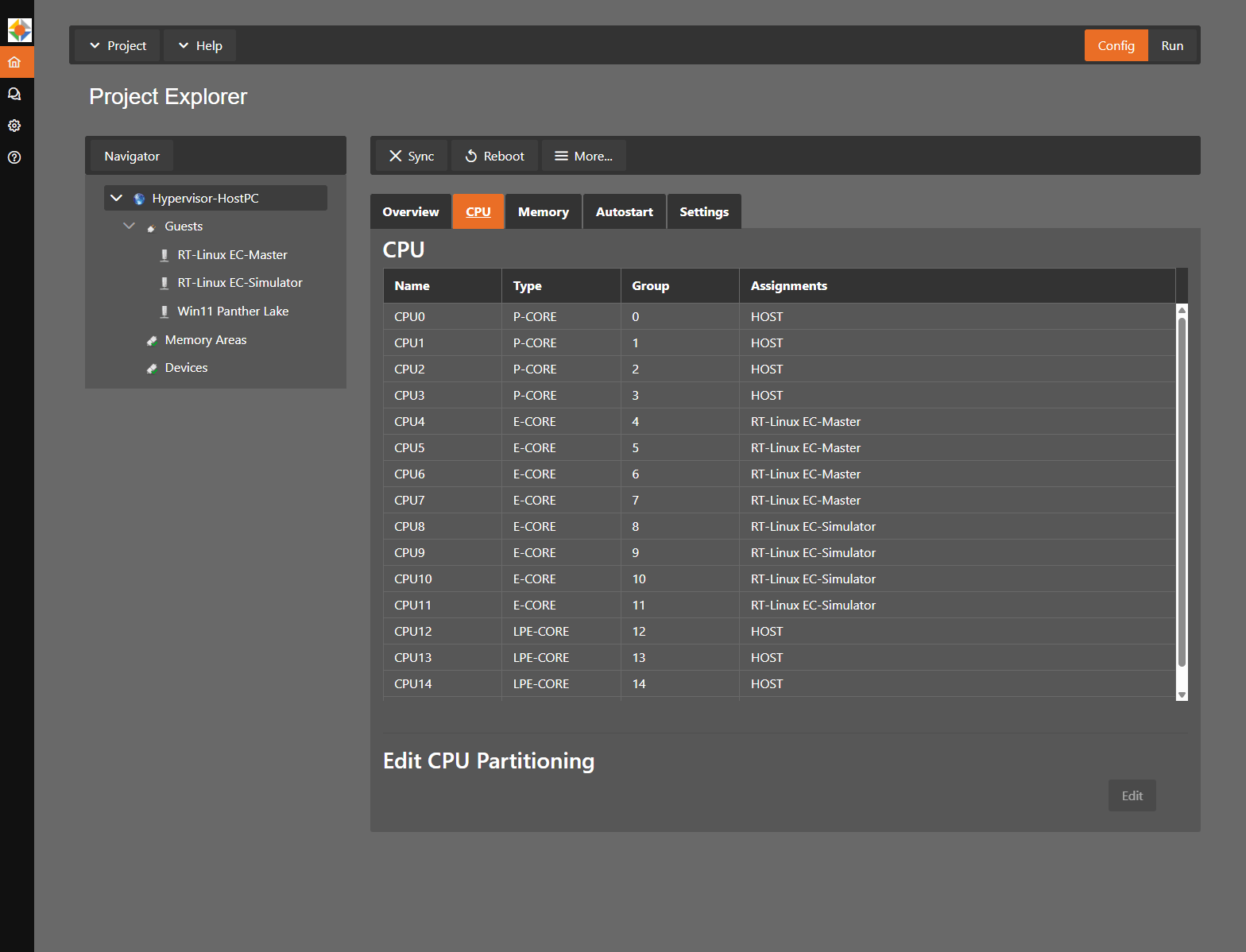
Now we create VM1 and VM3 and assign CPU cores, memory and Ethernet ports. VM2 is added in step 8. In the end, the split looks like this:
| VM | Name in System Manager | Type | CPU cores | Memory | Application | Ethernet |
|---|---|---|---|---|---|---|
| VM1 | RT-Linux EC-Master | Real-time Linux 6.18, real-time guest | CPU4 to CPU7: 4 E-cores (module 1), isolated | 512 MB | EC-Master, EC-Simulator SiL | Port 1, acontis Real-time Ethernet Driver emllIntelGbe |
| VM2 | RT-Linux EC-Simulator | Real-time Linux 6.18, real-time guest | CPU8 to CPU11: 4 E-cores (module 2), isolated | 512 MB | EC-Simulator HiL | Port 2, acontis Real-time Ethernet Driver emllIntelGbe |
| VM3 | Win11 Panther Lake | Windows 11, KVM guest, non-real-time | 5 vCPUs on CPU0 to CPU3 (P-cores) and CPU12 (LP E-core), shared with the host | 16000 MB | Windows applications, EC-Engineer | Port 3, connected via a host bridge (virtual network adapter) |
| Host | – | Debian Linux with acontis kernel | CPU13 to CPU15 (LP E-cores), plus CPU0 to CPU3 and CPU12 shared with Windows | – | System Manager | Port 3 (bridge to Windows) |
VM1, real-time Linux
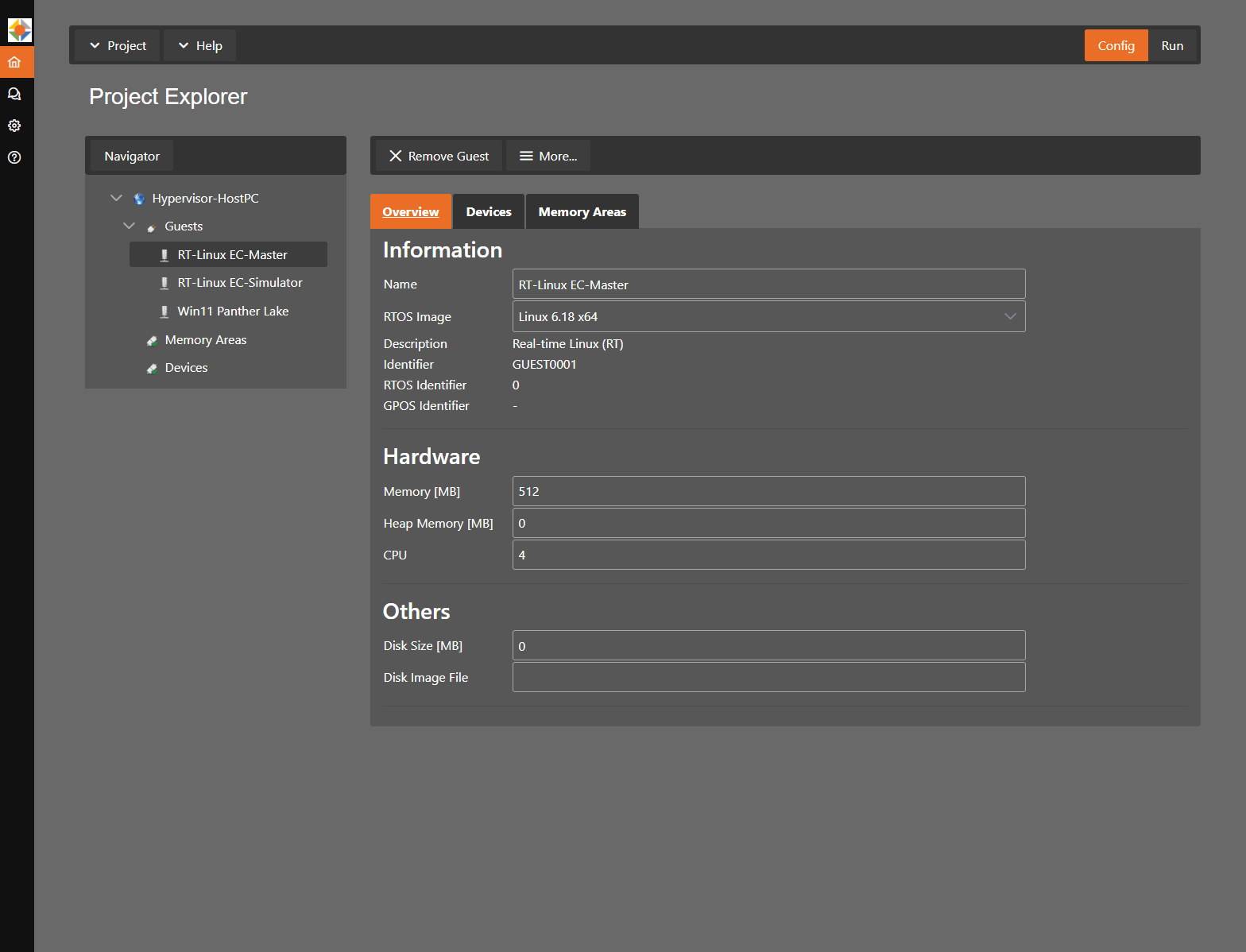
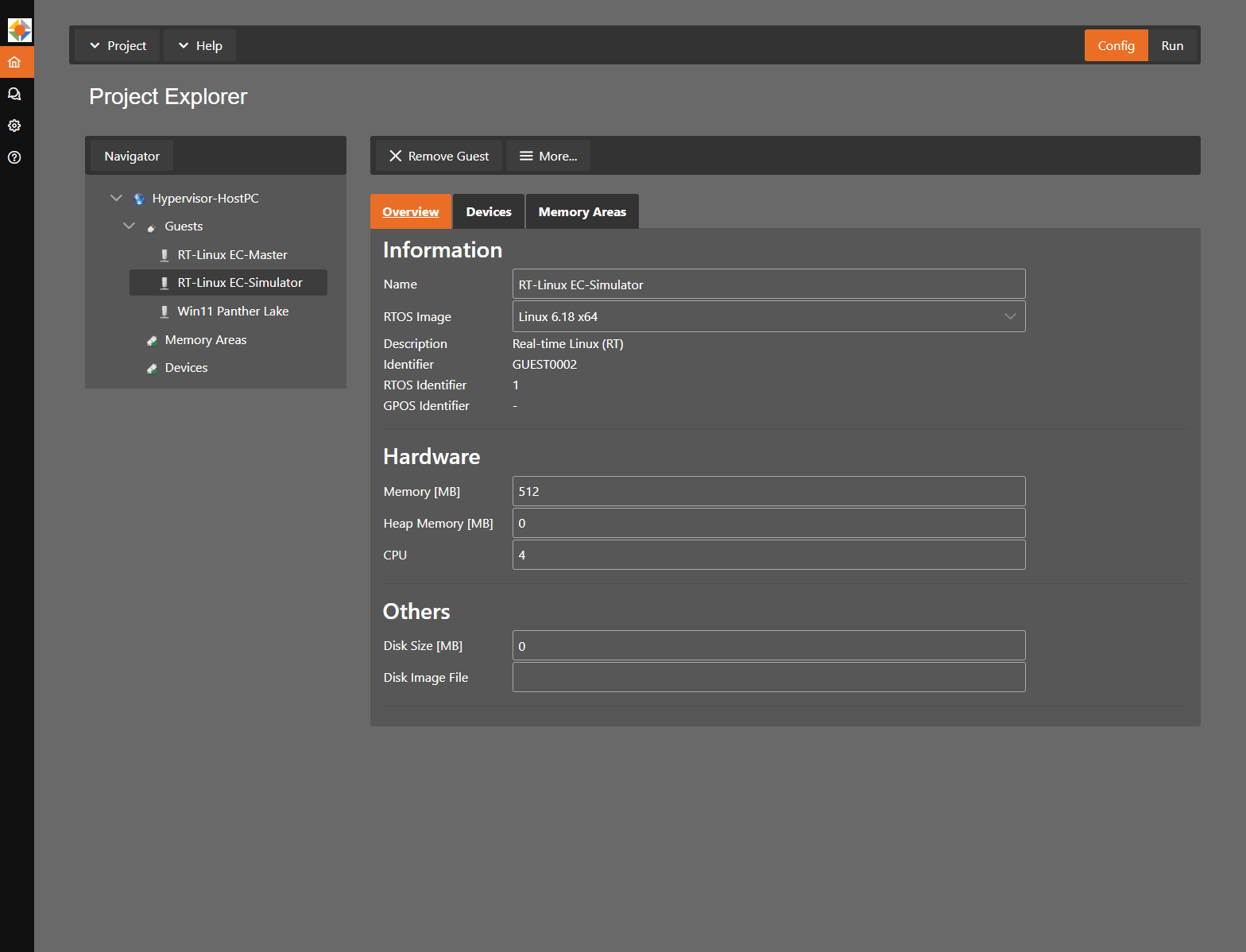
- Guests > Add Guest, name
RT-Linux EC-Master, type Real-time Linux (RT), image Linux 6.18 x64. - Memory: 512 MB.
- Host CPU tab, Edit: assign CPU4 to CPU7 to VM1.
- Devices tab: Add the Intel I210 on PCI bus 56 (Ethernet Port 1).
- Kernel command line: even though the host keeps the cores out of deep C-states, the Linux guest by default halts an idle real-time core, which then needs several microseconds to wake up again. With
idle=pollthe core polls actively instead. This setting is important for the best real-time values.noptiis the RTOSVisor default and stays in the line. Add these lines to/hv/guests/guest0001/usr.configon the host. The file belongs to the user and is not overwritten by the System Manager:[Rtos\Linux] "cmd_line"="nopti idle=poll"
The setting takes effect when the VMF is reloaded, so stop all guests before restarting VM1.
VM3, Windows
- Guests > Add Guest, name
Win11 Panther Lake, type General Purpose + CommSubsys (GP+CSS), Enable CommSubsys checked. - Memory 16000 MB, 5 CPUs (CPU0 to CPU3 and CPU12), disk size 75000 MB. Set Installation media file to the Windows ISO.
- Network: the onboard I219-V (Ethernet Port 3) is connected to Windows via a host bridge. Windows sees a virtual network adapter, and the host remains reachable on the same port. Alternatively, the I219-V can be assigned to Windows exclusively and used there with the standard Windows driver.
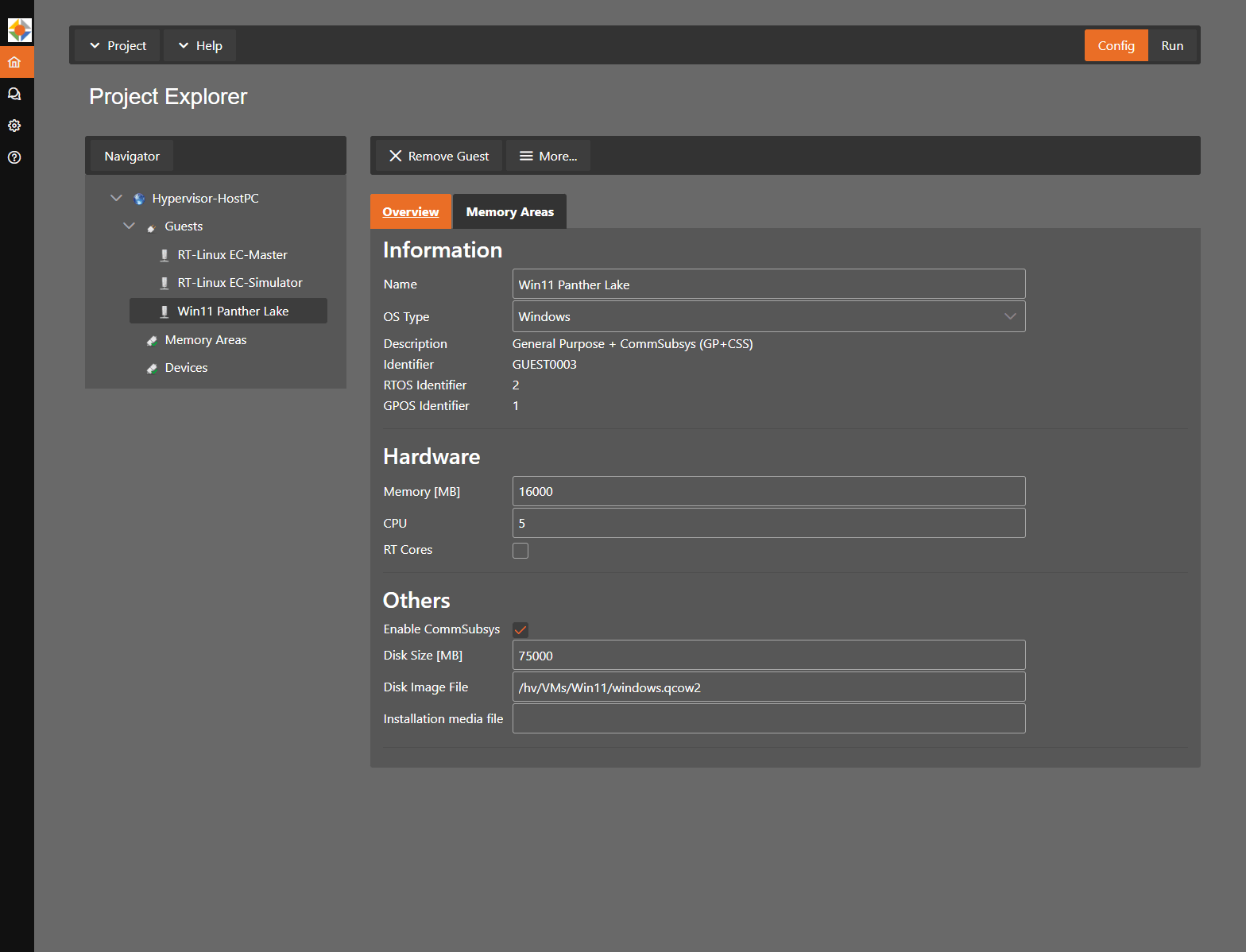
Press Sync to write the configuration and reboot the host when the System Manager asks you to.
Note: to identify the right Ethernet port, unplug its cable, press More... > Update Device Details and check the Link status in the device details.
After the reboot, the I210 is detached from the host and reserved for VM1:
$ lspci -nnk -s 56:00.0
56:00.0 Ethernet controller [0200]: Intel Corporation I210 Gigabit Network Connection [8086:1533] (rev 03)
        Kernel driver in use: pci-stub
        Kernel modules: igb
Windows is then installed in VM3 as described in the RTOSVisor Windows Guest Guide.
Step 5: Start the guests
Switch the System Manager to Run mode, press Start VMF, then Start Guest for VM1 and VM3. Alternatively, start them from the host shell. With -view, each guest opens in its own window on the host desktop; for Windows this is the normal Windows desktop:
hv_vmf_start
cd /hv/guests/guest0001 && hv_guest_start -view      # VM1, RT-Linux EC-Master
cd /hv/guests/guest0003 && hv_guest_start -view      # VM3, Win11 Panther Lake
Log in to VM1 via the Console tab or via SSH at 192.168.157.2.
Step 6: Install EC-Master on VM1
The host folder /hv/guests is mounted at /mnt/rtfiles in all real-time guests, i.e. in VM1 and later also in VM2. Programs and ENI files are therefore kept in one shared folder: /hv/guests/etc/rt-linux/files/ecat/ on the host is /mnt/rtfiles/etc/rt-linux/files/ecat/ in the guests. We therefore simply copy the EC-Master binaries on the host. The kernel module atemsys, which gives EC-Master direct hardware access, is already part of the RT-Linux image.
# on the host
tar xf EC-Master-V3.3.3.01-Linux-x86_64Bit-SDK_Unrestricted.tar.gz
tar xf EC-Master-ClassA-AddOn-V3.3.3.01-Linux-x86_64Bit-SDK_Unrestricted.tar.gz
tar xf EC-RtEth-IntelGbe-V3.3.3.01-Linux-x86_64Bit-SDK_Unrestricted.tar.gz
cp Bin/Linux/x64/* /hv/guests/etc/rt-linux/files/ecat/
Step 7: Install EC-Simulator SiL on VM1
# on the host
tar xf EC-Simulator-SiL-V3.3.3.01-Linux-x86_64Bit-SDK_Unrestricted.tar.gz
cp Bin/Linux/x64/* /hv/guests/etc/rt-linux/files/ecat/
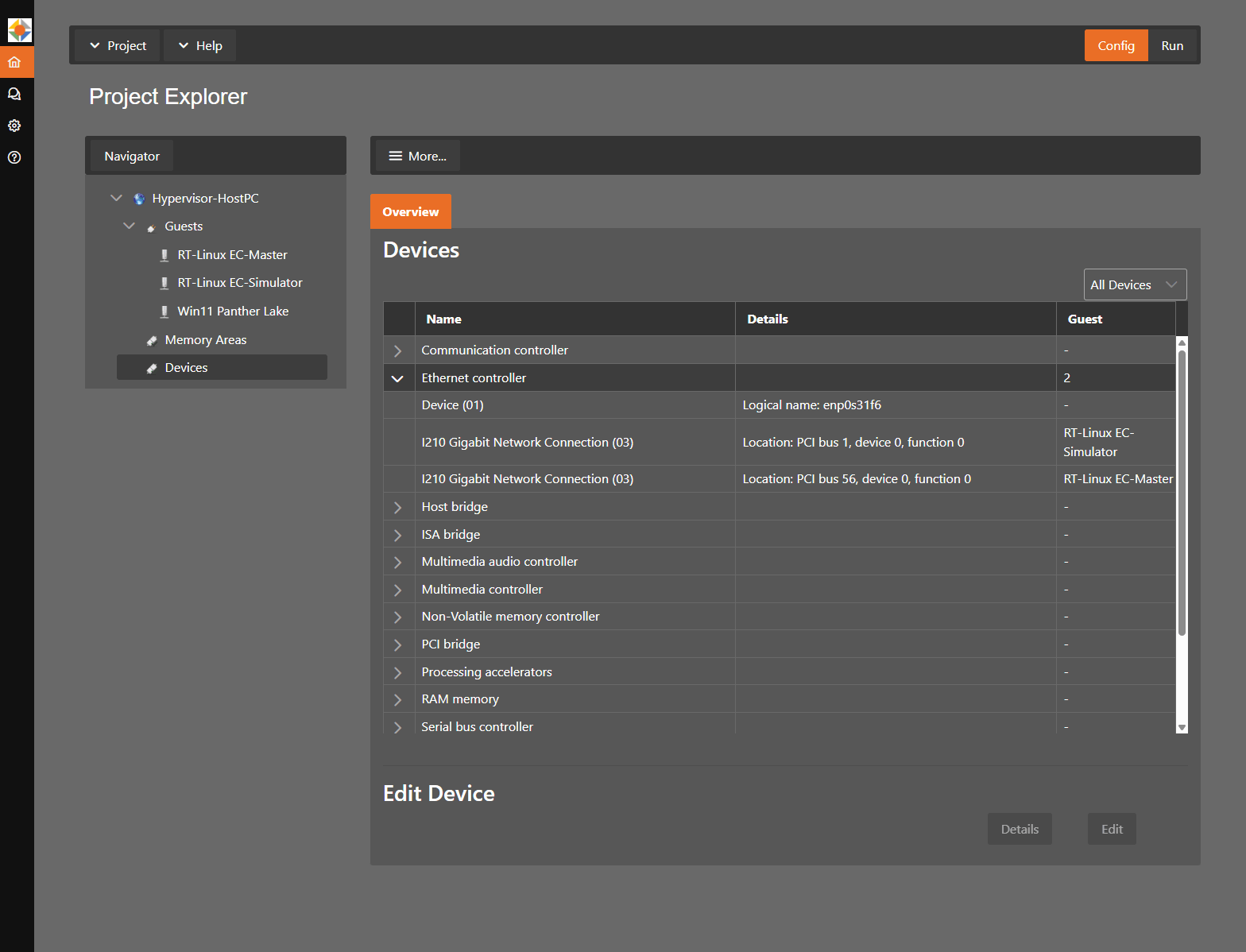
Step 8: Add Ethernet Port 2 and create VM2
We shut down the PC, disconnect it from the mains and plug in a second Intel I210 PCIe card. After the restart, in the System Manager:
- More... > Update Device Details to detect the new card.
- Guests > Add Guest, name
RT-Linux EC-Simulator, type Real-time Linux (RT), image Linux 6.18 x64, 512 MB memory. In the host CPU tab, assign CPU8 to CPU11. - Devices tab of VM2: Add the new I210 on PCI bus 1 (Ethernet Port 2).
- Add the same kernel command line as for VM1 to
/hv/guests/guest0002/usr.configso that VM2 also achieves the best real-time values. VM2 is the second real-time guest, so the section is[Rtos1\Linux]:[Rtos1\Linux] "cmd_line"="nopti idle=poll" - Sync and reboot the host.
The host Devices view now shows both I210 cards, each assigned to its own real-time guest:
$ lspci -nnk | grep -A2 I210
01:00.0 Ethernet controller [0200]: Intel Corporation I210 Gigabit Network Connection [8086:1533] (rev 03)
        Kernel driver in use: pci-stub
--
56:00.0 Ethernet controller [0200]: Intel Corporation I210 Gigabit Network Connection [8086:1533] (rev 03)
        Kernel driver in use: pci-stub
Start VM2 like VM1 (cd /hv/guests/guest0002 && hv_guest_start -view). It is reachable via SSH at 192.168.157.3.
Note: with two real-time guests, assign devices via the System Manager. The manual hv_addeth scripts support only a single RTOS guest.
Step 9: Install EC-Simulator HiL on VM2
# on the host
tar xf EC-Simulator-HiL-V3.3.3.01-Linux-x86_64Bit-SDK_Unrestricted.tar.gz
cp Bin/Linux/x64/* /hv/guests/etc/rt-linux/files/ecat/
EC-Simulator HiL goes into the same folder as EC-Master. VM2 also sees it at /mnt/rtfiles/etc/rt-linux/files/ecat/.
3. Creating the EtherCAT network configurations with EC-Engineer
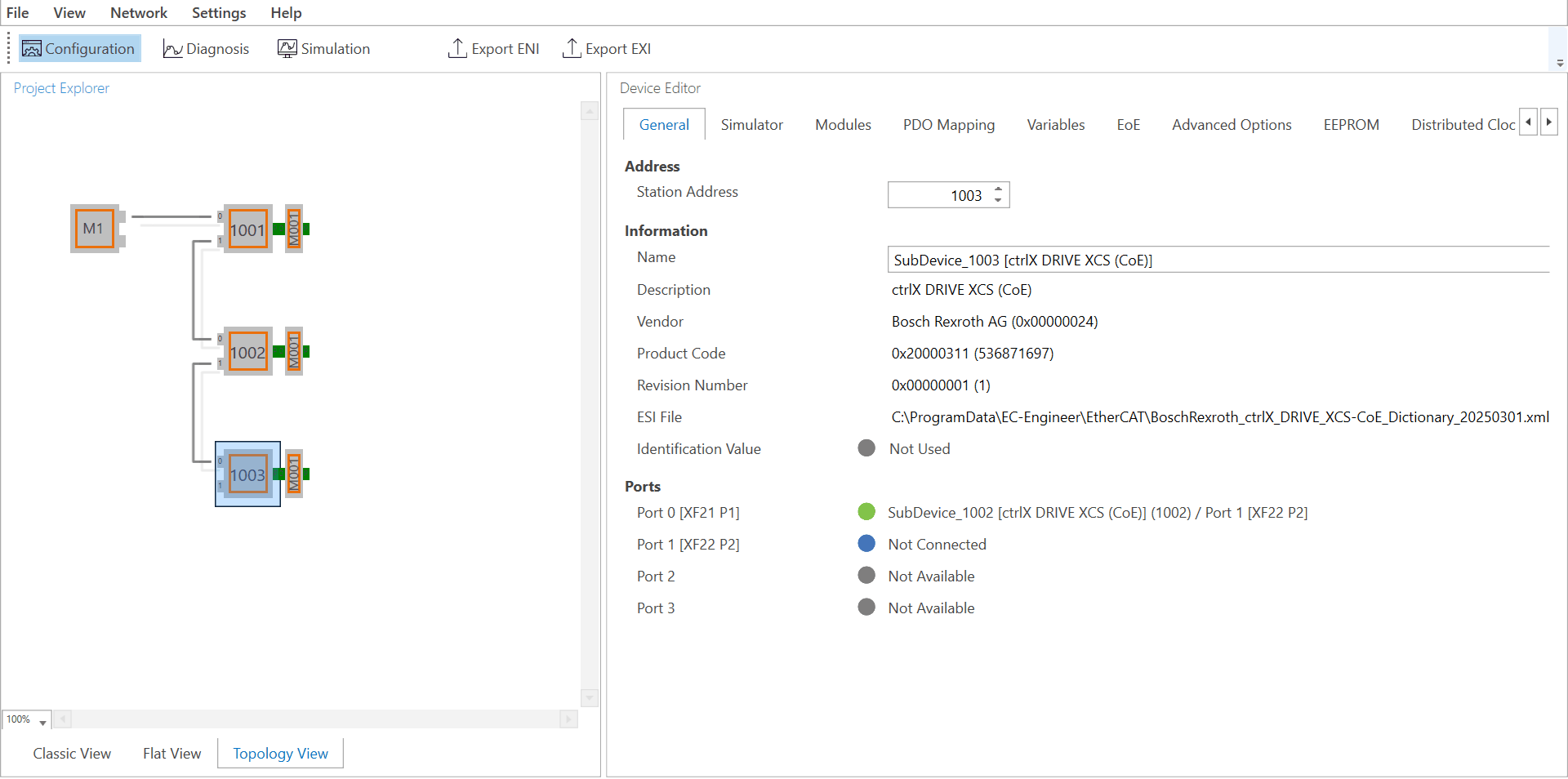
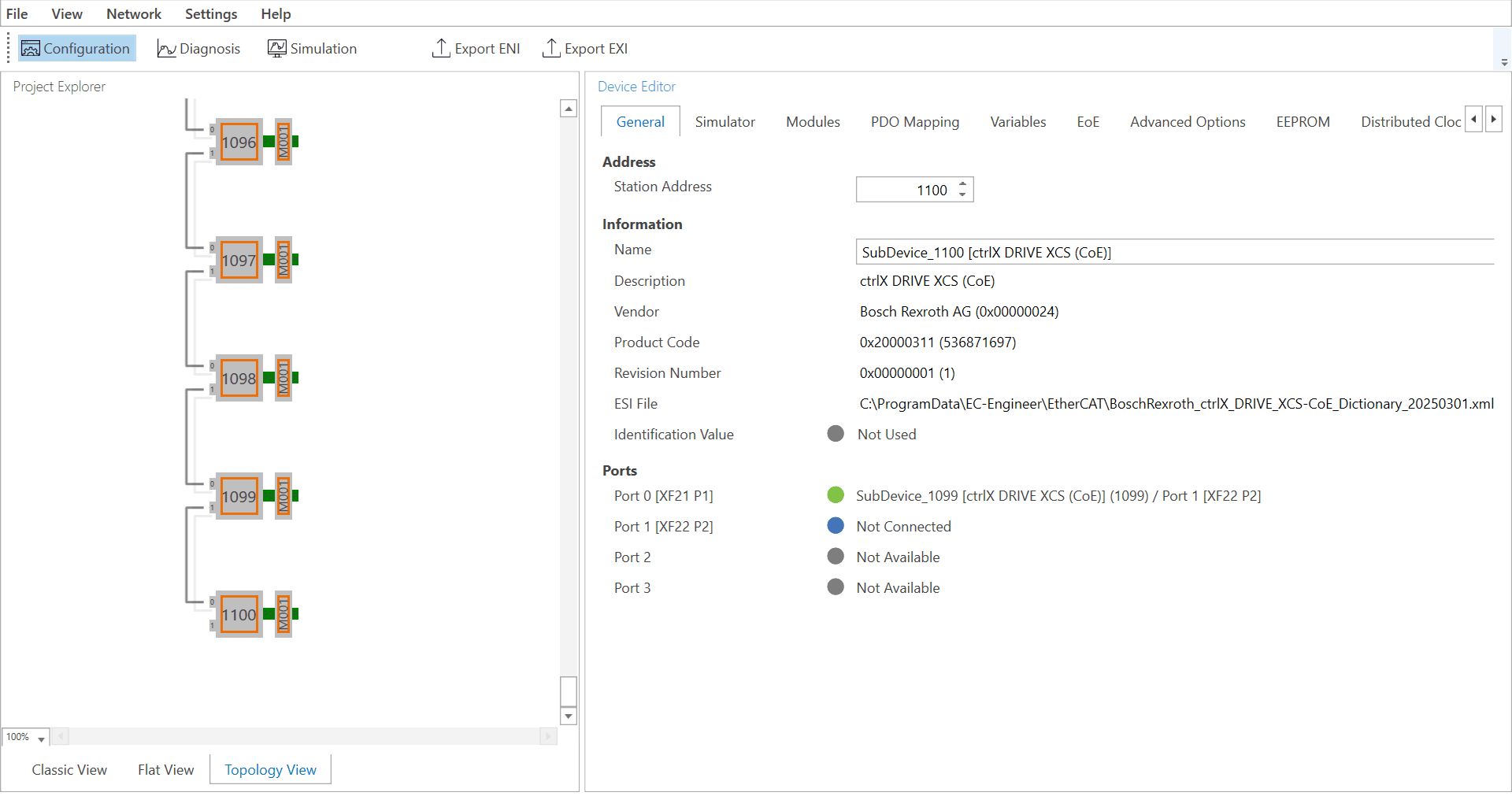
We create the network configurations with EC-Engineer in VM3 under Windows. EC-Engineer works in “Configuration Offline” mode: we build the networks from the device descriptions (ESI files) of the drives, without scanning a real network. EC-Engineer therefore needs no connection to the drives or to EC-Master in VM1. The result is an ENI file in each case, which we generate with Export ENI.
Windows has access to a shared folder on the host. Through it, we save the ENI files directly to /hv/guests/etc/rt-linux/files/ecat/. VM1 and VM2 then find them at /mnt/rtfiles/etc/rt-linux/files/ecat/, where the commands in chapter 4 expect them.
Network Configuration 1: 3 drives
We create the MainDevice and three ctrlX DRIVE XCS (CoE) drives, connect them in a line and set the cycle time to 1 ms. The result is the ENI file CFG1-3-BoschRexrothDrives.xml.
Network Configuration 2: 100 drives
In the same way we create a network with 100 drives, without any of the corresponding hardware. The result is CFG2-100-BoschRexrothDrives.xml.
4. Tests
With the three VMs and the two ENI files, the setup is complete. The five tests build on each other: from the platform, through the real drives, to the simulation in its own VM.
| Test | What we run | Setup |
|---|---|---|
| Test 1 | RTOSVisor real-time performance measurement | VM1 |
| Test 2 | EcMasterDemoDc with 3 physical drives | VM1, real drives on Port 1 |
| Test 3 | EcMasterDemoDc with EC-Simulator SiL, 3 simulated drives | VM1, Software-in-the-Loop |
| Test 4 | EcMasterDemoDc with EC-Simulator SiL, 100 simulated drives | VM1, Software-in-the-Loop |
| Test 5 | EcMasterDemoDc on VM1, EcSimulatorHilDemo on VM2, 100 simulated drives | VM1 + VM2, Hardware-in-the-Loop over cable |
Test 1: Real-time performance measurement
Before the EtherCAT tests, we measure timing in the real-time guest while Windows is under load on the same system. This establishes a baseline for the EtherCAT tests that follow.
RT-Linux ships with RealtimeDemo. It runs a task with a 1 ms period and measures the timer interrupt period, the task delay (the time from the timer interrupt to the start of the task) and the occurrence of SMIs (System Management Interrupts). SMIs are triggered by the firmware; they interrupt the CPU without the operating system noticing and are a typical cause of latency spikes. We run it in VM1 for 60 minutes while Windows in VM3 is under heavy load. We generate the load with Prime95 30.19 build 20, a freely available program. We run its torture test, a widely used stress test, in Blend mode on 4 of the 5 Windows vCPUs.
vm1:~# RealtimeDemo
Job period     : 1000 usec
CPU count      : 4
...
Timer interrupt period [usec] (Cur/Min/Max):
 via TSC  = 1000.2 / 991.9 / 1008.1
...
SMI occurrence = 0
Task delay [usec] (Min/Avg/Max) =  1.03 /   1.32 /   9.40
...
TaskCount = 3586332| Metric | Result |
|---|---|
| Duration | 60 min, 3,586,332 cycles of 1 ms |
| Timer period (min / max) | 991.9 / 1008.1 µs, max deviation 8.1 µs |
| Task delay (min / avg / max) | 1.03 / 1.32 / 9.40 µs |
| SMI occurrences | 0 |
The results contain two different values. The timer period shows the jitter of the periodic 1 ms timer: it stays within ±8.1 µs. The task delay is the wake-up latency from the timer interrupt to the start of the real-time task: 1.32 µs on average and at most 9.40 µs over 3.6 million cycles. In addition, no SMI occurred during the entire run. This is important because SMIs cannot be masked by the operating system or the hypervisor: while the firmware handles one, the CPU is unavailable to all software, including the real-time guest. A real-time platform should therefore not trigger SMIs during operation. All values were reached while Windows was under heavy load on the neighbouring cores. On this basis, the next test puts EC-Master into operation with the real drives.
Test 2: EC-Master with 3 real drives
Test 2 shows real operation: EC-Master controls three real drives via the I210, just as it later will on the machine. The focus is on the stability of the 1 ms cycle on the virtualised platform and on the CPU execution time the EtherCAT task needs for it.
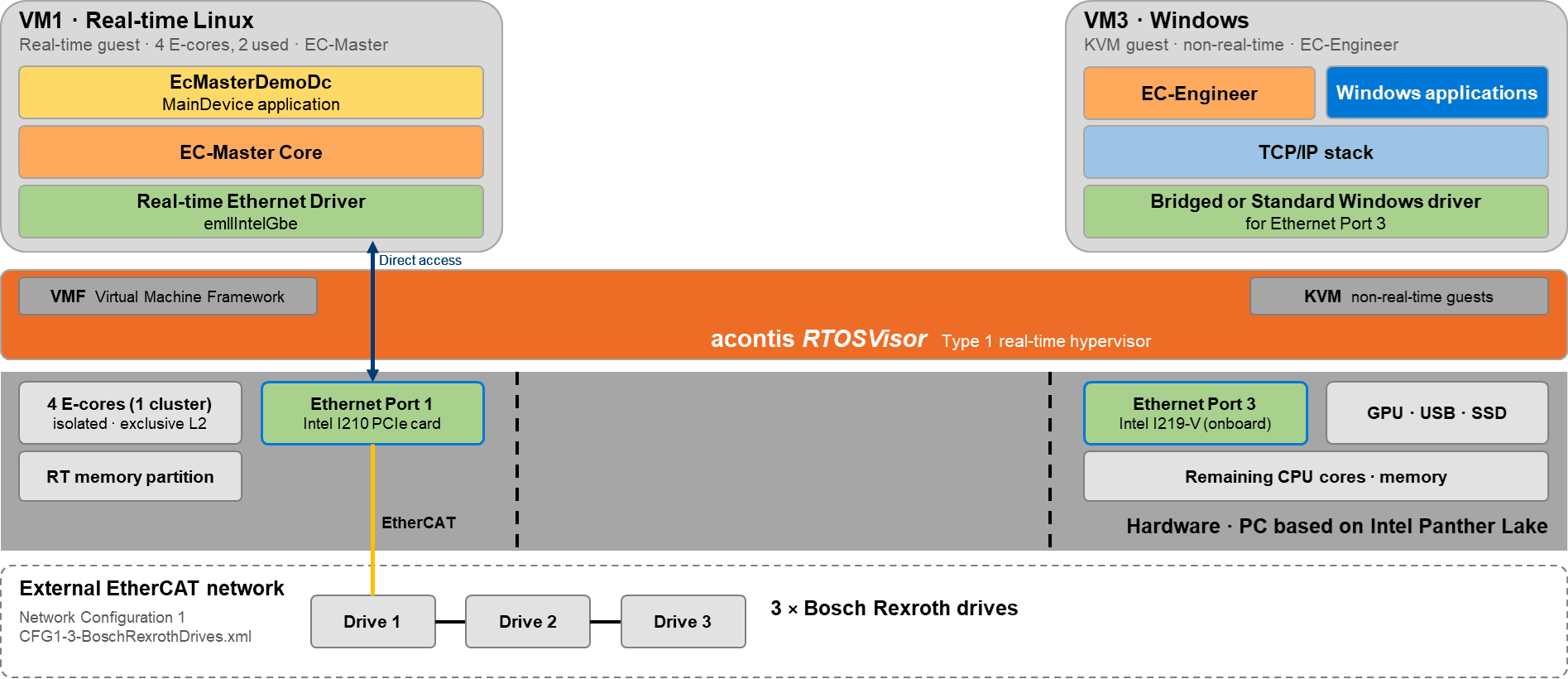
EC-Master runs in VM1 on isolated E-cores. VM1 owns a complete E-core module (four cores), so no other guest shares its L2 cache. EC-Master uses two of them: one core runs the cyclic EtherCAT task, the other runs Linux and the remaining tasks. The acontis Real-time Ethernet Driver emllIntelGbe accesses the I210 directly, bypassing the Linux network stack.
vm1:~# cd /mnt/rtfiles/etc/rt-linux/files/ecat
vm1:~# ./EcMasterDemoDc -f CFG1-3-BoschRexrothDrives.xml -b 1000 -t 0 -perf -v 3 -intelgbe 1 1
0000027350: Master state changed from <SAFEOP> to <OP>
...
Job times before shutdown
0000045851: ============================================================================
0000045851: PerfMsmt 'Cycle Time ' (min/avg/max) [us]: 998.1/1000.0/1002.5
0000045851: PerfMsmt 'Task Duration (JOB_Total + App)' (min/avg/max) [us]: 4.4/ 21.3/ 24.2
0000045851: PerfMsmt 'JOB_Total ' (min/avg/max) [us]: 3.9/ 20.5/ 23.4
0000045851: PerfMsmt 'JOB_ProcessAllRxFrames Duration' (min/avg/max) [us]: 0.5/ 0.7/ 2.8
0000045851: PerfMsmt 'JOB_SendAllCycFrames Duration ' (min/avg/max) [us]: 2.5/ 19.0/ 19.6
0000045851: PerfMsmt 'JOB_MasterTimer Duration ' (min/avg/max) [us]: 0.6/ 0.7/ 2.3
0000045851: PerfMsmt 'JOB_SendAcycFrames Duration ' (min/avg/max) [us]: 0.1/ 0.1/ 1.2
0000045851: PerfMsmt 'myAppWorkPd ' (min/avg/max) [us]: 0.0/ 0.1/ 0.2| Metric | Result |
|---|---|
| Cycle time (min / avg / max) | 998.1 / 1000.0 / 1002.5 µs |
| CPU execution time (min / avg / max) | 4.4 / 21.3 / 24.2 µs |
| Load of the EtherCAT task | just over 2 % of one core |
EC-Master brings all three drives to the OP state, and the Distributed Clocks are in sync. The cycle time deviates by at most 2.5 µs from 1 ms. The EtherCAT task takes 21.3 µs per cycle on average, leaving around 970 µs for the control application. The largest share is JOB_SendAllCycFrames at 19 µs: sending the frames via the I210.
During development, however, real drives are often not yet available. This is where EC-Simulator comes in.
Test 3: EC-Simulator SiL with 3 drives
With Test 3 we switch to Software-in-the-Loop: we replace the three real drives from Test 2 with a simulation and check whether the application runs unchanged with the same ENI file. This lets you develop and test an EtherCAT application at your desk, including automated tests, without drives and without cabling.
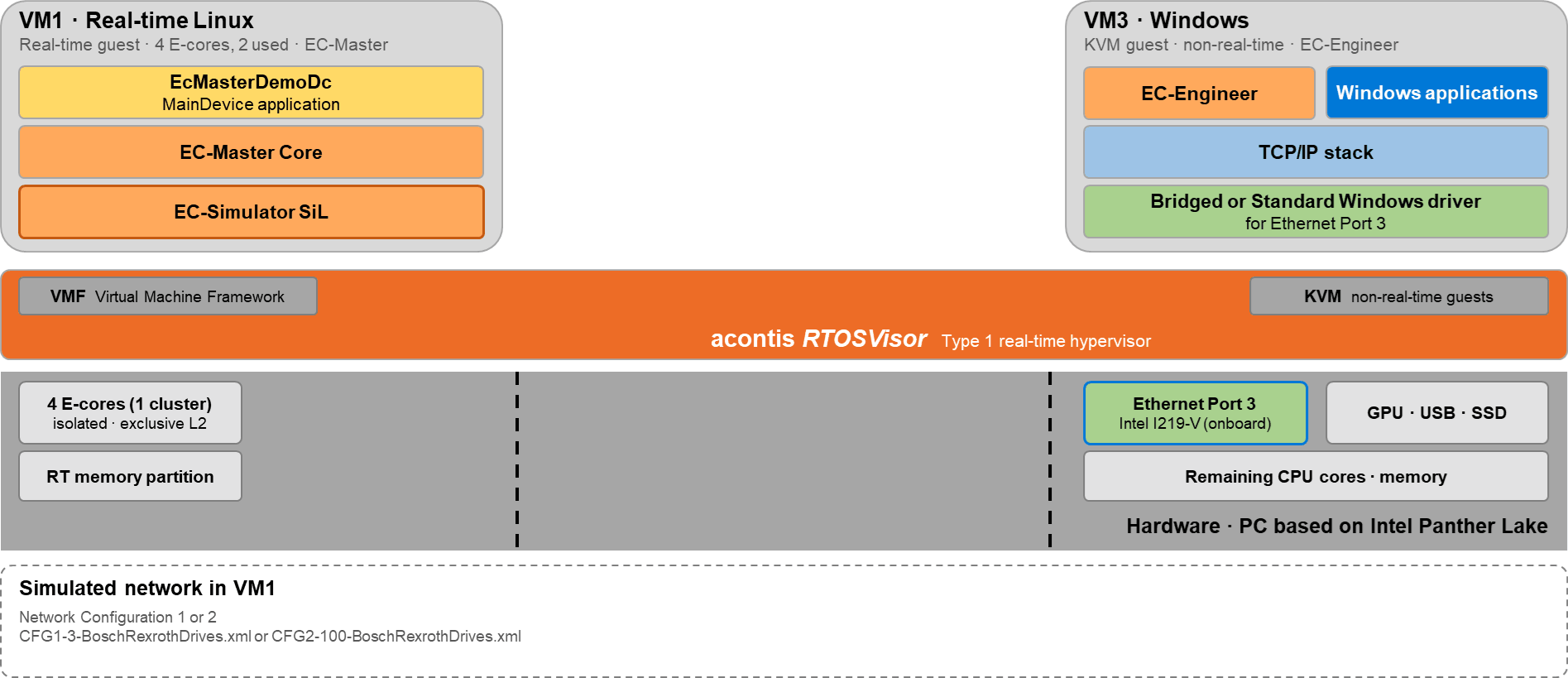
With EC-Simulator SiL, the EtherCAT network runs as software in VM1. Neither an Ethernet port nor drives are needed.
vm1:~# ./EcMasterDemoDc -f CFG1-3-BoschRexrothDrives.xml -b 1000 -t 0 -perf -v 3 -simulator 1 1 CFG1-3-BoschRexrothDrives.xml0000156400: ============================================================================
0000156400: PerfMsmt 'Cycle Time ' (min/avg/max) [us]: 997.2/1000.0/1002.3
0000156400: PerfMsmt 'Task Duration (JOB_Total + App)' (min/avg/max) [us]: 5.2/ 5.5/ 8.6
0000156400: PerfMsmt 'JOB_Total ' (min/avg/max) [us]: 4.9/ 5.2/ 8.1
0000156400: PerfMsmt 'JOB_ProcessAllRxFrames Duration' (min/avg/max) [us]: 0.3/ 0.3/ 0.9
0000156400: PerfMsmt 'JOB_SendAllCycFrames Duration ' (min/avg/max) [us]: 3.1/ 3.3/ 4.3
0000156400: PerfMsmt 'JOB_MasterTimer Duration ' (min/avg/max) [us]: 1.3/ 1.5/ 2.5
0000156400: PerfMsmt 'JOB_SendAcycFrames Duration ' (min/avg/max) [us]: 0.1/ 0.1/ 1.1
0000156400: PerfMsmt 'myAppWorkPd ' (min/avg/max) [us]: 0.0/ 0.1/ 0.5With three simulated drives, the EtherCAT task needs only 5.5 µs per cycle on average, less than 1 % of the cycle time. The largest share is JOB_SendAllCycFrames at 3.3 µs on average: in SiL mode, EC-Simulator processes the frames directly when they are sent instead of sending them over a cable. Even at its maximum of 8.6 µs, the CPU execution time stays below 1 % of the cycle, and the cycle time deviates by at most 2.8 µs from 1 ms.
The key point: EcMasterDemoDc runs with the same ENI file as with the real drives in Test 2. The application can therefore be developed and tested without hardware. With three drives, however, the computing load of the simulation is still low.
Test 4: EC-Simulator SiL with 100 drives
Test 4 enlarges the network: 3 simulated drives become 100. Networks like this exist in large machines but practically never at a developer's desk. We examine whether EC-Simulator SiL can also model 100 drives and how much CPU execution time the EtherCAT task needs when it also computes the simulation of all drives.
vm1:~# ./EcMasterDemoDc -f CFG2-100-BoschRexrothDrives.xml -b 1000 -t 0 -perf -v 3 -simulator 1 1 CFG2-100-BoschRexrothDrives.xml -dcmmode off0000032774: ============================================================================
0000032774: PerfMsmt 'Cycle Time ' (min/avg/max) [us]: 998.9/1000.0/1001.1
0000032774: PerfMsmt 'Task Duration (JOB_Total + App)' (min/avg/max) [us]: 88.1/ 92.3/ 100.1
0000032774: PerfMsmt 'JOB_Total ' (min/avg/max) [us]: 87.7/ 91.9/ 99.8
0000032774: PerfMsmt 'JOB_ProcessAllRxFrames Duration' (min/avg/max) [us]: 0.4/ 0.6/ 1.5
0000032774: PerfMsmt 'JOB_SendAllCycFrames Duration ' (min/avg/max) [us]: 63.8/ 64.5/ 66.3
0000032774: PerfMsmt 'JOB_MasterTimer Duration ' (min/avg/max) [us]: 23.0/ 24.3/ 25.0
0000032774: PerfMsmt 'JOB_SendAcycFrames Duration ' (min/avg/max) [us]: 0.1/ 2.6/ 8.3
0000032774: PerfMsmt 'myAppWorkPd ' (min/avg/max) [us]: 0.0/ 0.1/ 0.1Even with 100 simulated drives, EC-Master holds the 1 ms cycle. However, the CPU execution time rises to 92.3 µs on average and 100.1 µs at maximum, about 17 times as much as in Test 3. The reason: in SiL mode, the simulation of all 100 drives runs in the context of the EtherCAT task. Around 70 % of the CPU execution time is spent in JOB_SendAllCycFrames, where EC-Simulator processes the frames.
With around 900 µs of headroom per cycle, there is plenty of room for functional tests of the application. However, the computing time of the simulation grows with the number of drives and is lost to the control application on the same core. Above all, though, SiL leaves part of the system untested: the Ethernet hardware and the real transmission of the frames. That is why in the next step we move the simulation to its own VM and connect the MainDevice and the simulator with a real cable.
Test 5: EC-Simulator HiL with 100 drives
Test 5 concludes with Hardware-in-the-Loop. The controller is tested the way it will later run on the machine: with real EtherCAT frames over its own Ethernet port and a real cable. The simulation of the 100 drives runs in its own VM. The goal is to test the complete path, including the Ethernet hardware, under realistic conditions. At the same time, the MainDevice is relieved of the computing time of the simulation.
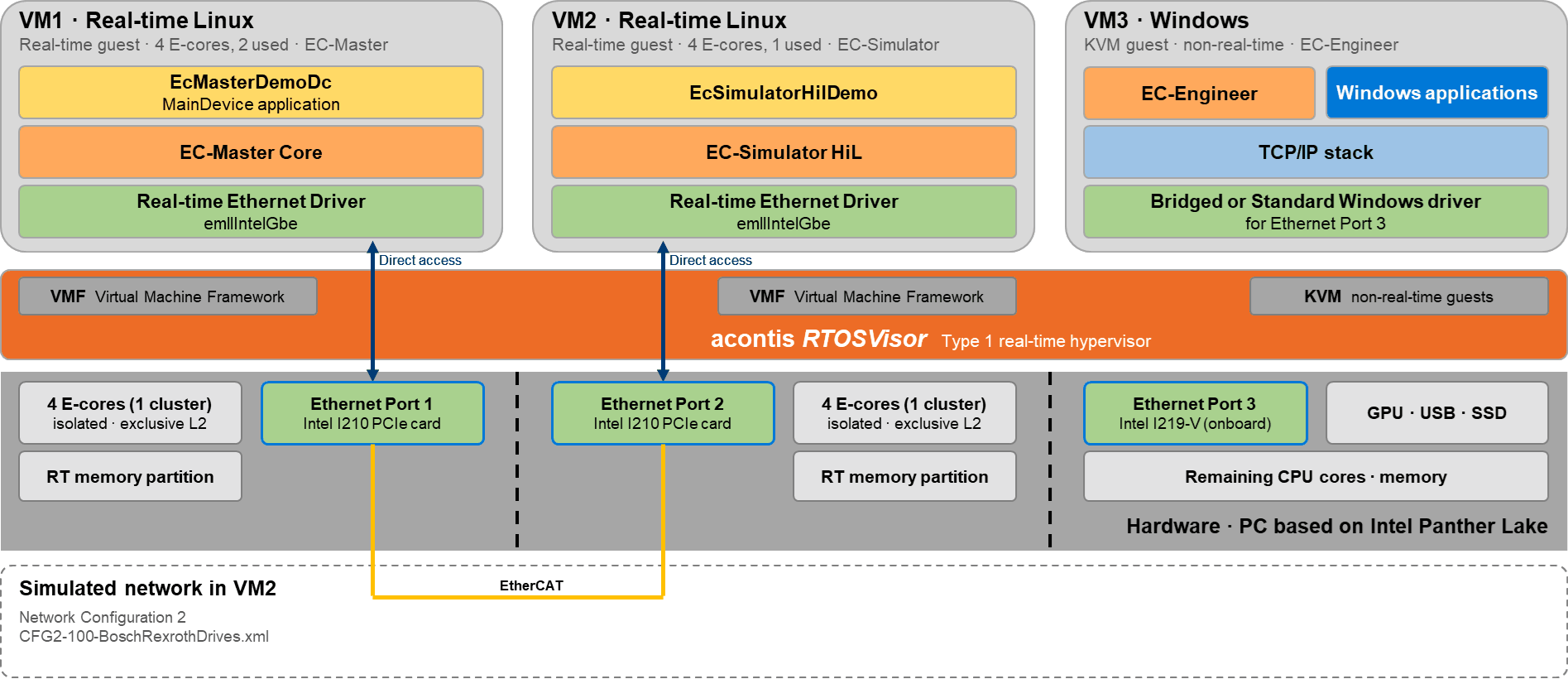
EC-Simulator HiL runs in VM2 on isolated E-cores and responds as 100 drives via Ethernet Port 2.
Unplug the cable to the three drives from Ethernet Port 1 and instead connect Port 1 directly to Port 2 with an Ethernet cable. Start the simulator first, then the MainDevice.
# VM2
vm2:~# cd /mnt/rtfiles/etc/rt-linux/files/ecat
vm2:~# ./EcSimulatorHilDemo -f CFG2-100-BoschRexrothDrives.xml -intelgbe 1 1

# VM1
vm1:~# ./EcMasterDemoDc -f CFG2-100-BoschRexrothDrives.xml -b 1000 -t 0 -perf -v 3 -intelgbe 1 1
0000000: EcSimulatorHilDemo V3.3.3.01 for Linux_x64 Copyright acontis technologies GmbH @ 2026
0236377: Slave 1001: state changed to <OP>
0236377: Slave 1002: state changed to <OP>
…………
0236377: Slave 1094: state changed to <OP>
0236377: Slave 1095: state changed to <OP>
0236377: Slave 1096: state changed to <OP>
0236377: Slave 1097: state changed to <OP>
0236377: Slave 1098: state changed to <OP>
0236377: Master state changed from <SAFEOP> to <OP>
0236378: Slave 1099: state changed to <OP>
0236378: Slave 1100: state changed to <OP>0049247: ============================================================================
0049247: PerfMsmt 'Cycle Time ' (min/avg/max) [us]: 997.8/1000.0/1002.1
0049247: PerfMsmt 'Task Duration (JOB_Total + App)' (min/avg/max) [us]: 18.4/ 35.2/ 37.4
0049247: PerfMsmt 'JOB_Total ' (min/avg/max) [us]: 17.7/ 34.4/ 36.7
0049247: PerfMsmt 'JOB_ProcessAllRxFrames Duration' (min/avg/max) [us]: 0.6/ 1.0/ 2.2
0049247: PerfMsmt 'JOB_SendAllCycFrames Duration ' (min/avg/max) [us]: 2.5/ 19.0/ 19.4
0049247: PerfMsmt 'JOB_MasterTimer Duration ' (min/avg/max) [us]: 13.7/ 14.2/ 15.3
0049247: PerfMsmt 'JOB_SendAcycFrames Duration ' (min/avg/max) [us]: 0.1/ 0.1/ 1.0
0049247: PerfMsmt 'myAppWorkPd ' (min/avg/max) [us]: 0.0/ 0.1/ 0.4All 100 simulated drives reach the OP state, and EC-Master switches from SAFEOP to OP. Because EC-Simulator HiL now runs in VM2 on its own E-core module, the EtherCAT task in VM1 no longer has to compute the simulation. The average CPU execution time therefore drops from 92.3 µs (SiL, Test 4) to 35.2 µs, a reduction of more than 60 %.
The timing remains precise: the cycle time deviates by at most 2.2 µs from 1 ms. With a maximum CPU execution time of 37.4 µs, more than 960 µs per cycle remain free for the actual control application, with 100 drives over a real cable.
Comparison: SiL and HiL
The three simulation tests at a glance:
| Test | Setup | CPU execution time avg / max | Cycle time min / max |
|---|---|---|---|
| Test 3 | SiL in VM1, 3 drives | 5.5 / 8.6 µs | 997.2 / 1002.3 µs |
| Test 4 | SiL in VM1, 100 drives | 92.3 / 100.1 µs | 998.9 / 1001.1 µs |
| Test 5 | HiL, VM1 + VM2, 100 drives | 35.2 / 37.4 µs | 997.8 / 1002.1 µs |
Software-in-the-Loop (SiL) supports development and testing without physical drives. With large simulated networks, the simulation shares compute resources with the MainDevice. In this setup, Hardware-in-the-Loop (HiL) runs in its own VM and uses Ethernet hardware to test the complete path. Both variants use the same system and ENI file.
5. Conclusion
Our measurements in this specific configuration cover EtherCAT control with three physical drives and a simulated network of 100 drives on a system powered by an Intel® Core™ Ultra X7 358H processor (Panther Lake-H):
- A single system powered by an Intel® Core™ Ultra X7 358H processor runs real-time EtherCAT control, network simulation and Windows side by side.
- Real-time performance: over 60 minutes with Windows under heavy load, the real-time guest keeps its 1 ms timer period within ±8.1 µs, with a task delay (wake-up latency) of 1.3 µs on average and at most 9.4 µs.
- EC-Master controls 3 real drives at a 1 ms cycle time. The EtherCAT task takes 21.3 µs per cycle on average, just over 2 % of one core.
- Each real-time guest owns a complete E-core module including its L2 cache, so no other guest can evict its L2 cache lines.
- EC-Simulator scales the same application to 100 drives, first in software (SiL), then over a real cable (HiL), without changing the application. In SiL with 100 drives, the CPU execution time averages 92 µs. In HiL with its own VM, it drops to 35 µs, with a cycle deviation of at most 2.2 µs.
Would you like to try the setup yourself or transfer it to your own hardware? On www.acontis.com you can request evaluation versions of RTOSVisor, EC-Master and EC-Simulator. Our sales team will be happy to answer any questions about your application.
Sources
- RTOSVisor (acontis)
- EC-Master (acontis)
- EC-Simulator (acontis)
- RTOSVisor documentation (acontis Developer Center)
Disclaimer
Performance results are based on testing conducted by acontis using the configurations described in this article. Results may vary depending on system configuration and other factors.
Intel, the Intel logo, and Intel Core are trademarks of Intel Corporation or its subsidiaries.
Intel, the Intel logo, and Intel SpeedStep are trademarks of Intel Corporation or its subsidiaries.